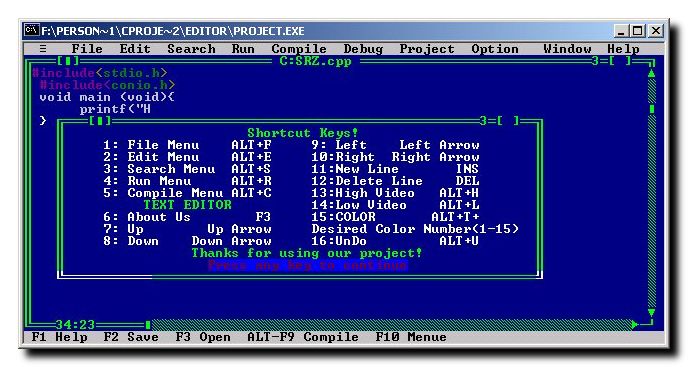
Turbo C is one of the most iconic C compilers in the history of programming. Developed by Borland in the 1980s, it revolutionized the way developers wrote, compiled, and debugged C programs. Despite being outdated by modern standards, Turbo C remains a nostalgic favorite among programmers and is still used in educational settings to teach the basics of C programming. In this article, we’ll explore the history and features of Turbo C, and provide a step-by-step guide to creating a Turbo C-like compiler interface using C programming.
Turbo C is an Integrated Development Environment (IDE) and compiler for the C programming language. It was designed to provide a user-friendly interface for writing, compiling, and debugging C programs. Turbo C was particularly popular in the 1980s and 1990s due to its fast compilation speed, compact size, and affordability.
While modern compilers like GCC, Clang, and Visual Studio have surpassed Turbo C in terms of features and performance, Turbo C remains a significant milestone in the evolution of programming tools. Its simplicity and ease of use make it an excellent tool for beginners learning C programming.
Its simplicity makes it an excellent tool for beginners — if you’re just starting out, our C programming tutorials cover the fundamentals step by step.
Table of Contents
- History of Turbo C
- Key Features of Turbo C
- Why Turbo C is Still Relevant
- How to Download and Run Turbo C on Windows 10 and 11
- Turbo C vs Modern C Compilers
- Creating a Turbo C-Like Compiler Interface in C
History of Turbo C
Borland built Turbo C to bring the same fast, integrated experience as its hugely popular Turbo Pascal to the C language. (Turbo Pascal’s architect, Anders Hejlsberg, later went on to create Delphi, C# and TypeScript.) Turbo C was a game changer at the time because it combined a text editor, compiler, and debugger into a single, easy-to-use package.
Key Milestones:
- 1987: Turbo C 1.0 was released, offering a fast and efficient compiler with an integrated development environment.
- 1989: Turbo C 2.0 was introduced, featuring an improved IDE, better debugging tools, and support for larger programs.
- 1990s: Turbo C was eventually succeeded by Borland C++, which added support for C++ programming.
Despite being discontinued, Turbo C’s legacy lives on, and it continues to be used in some educational institutions to teach the fundamentals of C programming.
Key Features of Turbo C
Turbo C was packed with features that made it a favorite among developers. Here are some of its standout features:
a) Integrated Development Environment (IDE)
Turbo C’s IDE combined a text editor, compiler, and debugger into a single interface. This eliminated the need for separate tools and streamlined the development process.
b) Fast Compilation
One of Turbo C’s most notable features was its lightning-fast compilation speed. This was a significant advantage at a time when computers were much slower than they are today.
c) Debugging Tools
Turbo C included a built-in debugger that allowed developers to step through their code, set breakpoints, and inspect variables.
d) Compact Size
The entire Turbo C package was small enough to fit on a single floppy disk, making it easy to distribute and install.
e) Affordable Pricing
Turbo C was priced affordably, making it accessible to a wide range of users, including students and hobbyists.
Why Turbo C is Still Relevant
While Turbo C is no longer used in professional software development, it remains relevant for several reasons:
a) Educational Use
Turbo C is still used in some schools and universities to teach C programming. Its simplicity and straightforward interface make it an excellent tool for beginners.
b) Nostalgia
For many programmers, Turbo C holds a special place in their hearts. It was often their first introduction to programming, and using it can evoke a sense of nostalgia.
c) Lightweight and Easy to Use
Turbo C’s small size and minimal system requirements make it ideal for running on older hardware or in virtual machines.
How to Download and Run Turbo C on Windows 10 and 11
Turbo C was built for 16-bit DOS, so it will not run natively on 64-bit Windows 10 or 11. The standard way to run it on a modern machine is through DOSBox, a free DOS emulator.
- Install DOSBox. Download it from the official site (dosbox.com) and install it.
- Download Turbo C and unzip it into a folder, for example
C:\TurboC. - Mount the folder in DOSBox. Launch DOSBox and type:
mount c c:\TurboCthenc:to switch to it. - Open the IDE. Navigate to the
BINfolder (cd BIN) and runTC.EXE. - Set the directories (first run only): in the IDE, go to Options → Directories and point the Include and Library paths to your Turbo C
INCLUDEandLIBfolders.
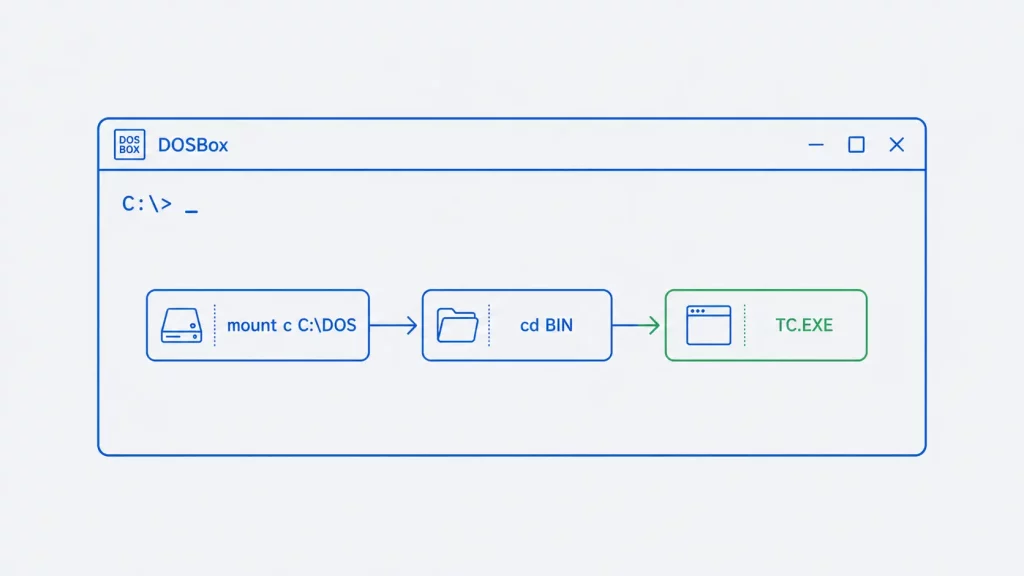
Turbo C will now open in its classic blue IDE, ready to compile. If you only need a modern C compiler rather than the Turbo C experience specifically, a current toolchain like GCC or Clang is a better choice for real work — see the comparison below.
In practice, the step most learners get stuck on is the Options → Directories setup — if the compiler reports ‘Unable to open include file stdio.h’, the Include/Library paths are almost always the cause, not your code.
Turbo C vs Modern C Compilers
| Turbo C | GCC / Clang | |
|---|---|---|
| Released | 1987 (DOS, 16-bit) | Actively maintained |
| C standard support | Pre-ANSI / C89 | Through C23 |
| Platform | DOS / DOSBox | Windows, Linux, macOS |
| Graphics | BGI (graphics.h) | Modern libraries (SDL, OpenGL) |
| Best for | Learning basics, nostalgia, legacy code | All modern development |
Turbo C is excellent for understanding fundamentals in a simple environment, but anything you build for real use should target a modern, standards-compliant compiler.
Ready to move beyond Turbo C? See our guide to the best modern C and C++ compilers for real-world development.
Creating a Turbo C-Like Compiler Interface in C
If you’re interested in recreating the look and feel of the Turbo C compiler interface, you can do so using C programming. Below is a simple example of how to create a basic text-based compiler interface in C.
This C program is developed by using graphics library which is a built in graphics library in Turbo C IDE.
This C program uses line() function to draw the lines and setcolor() function to change the colors of different items.
The function outtextxy() is used to draw text at different locations.
These come from graphics.h, the BGI (Borland Graphics Interface) library built into Turbo C. They are not part of standard C and will not compile under GCC or Clang without a BGI-compatible library such as WinBGIm or SDL_bgi — which is part of why this demo is tied to the Turbo C environment.
This is a basic example, but you can expand it by adding file I/O, integrating an actual C compiler, or even creating a graphical user interface (GUI) using libraries like GTK or WinAPI.
 C/C++ Compiler Interface (52.1 KiB, 10,533 hits)